
Windows 11 右鍵選單功能升級與雲端重建選項正式推出
Microsoft fixes a Windows 11 annoyance as PC revenue declines
Windows 11 右鍵選單功能升級與雲端重建選項正式推出。
- Windows 11 右鍵選單功能升級:Microsoft 釋出 KB5127936 先行預覽更新,允許使用者自訂右鍵選單,開關內建命令、重新排序並控制第三方擴充功能。
AI 伴隨問答
針對這篇報導有疑問?可直接點選快捷問題或向 AI 追問背景脈絡與技術細節:
Microsoft is beginning the rollout of a Windows 11 preview update that finally addresses a persistent power user complaint with the operating system: the right-click menu that obliterated years of muscle memory on command locations and hid others behind an additional click. The timing is notable, as the announcement comes alongside Microsoft’s quarterly financial report, which showed a continued decline in the business of selling Windows licenses for new PCs.
The preview update, KB5127936, is cumulative for Windows 11 versions 26H2 and 25H2. The update will be a gradual rollout before eventually moving on to a normal rollout for all Windows 11 devices once it reaches general availability. The highlight of the new update should calm annoyed users who have spent years with custom scripts and services in an attempt to shape Windows the way they would prefer it. Users will get a “customize menu” button that controls what commands appear when they right-click their mouse. Users can toggle built-in commands such as Send To or Create Shortcut on or off, rearrange what appears on the main menu, and control which third-party extensions show up in either the main or submenus. The gripe with the right-click menu had been that Microsoft hid familiar command locations behind a top row of icons while moving other familiar commands under the “Show more options” submenu. Now, Windows users can customize the whole thing around their habits.
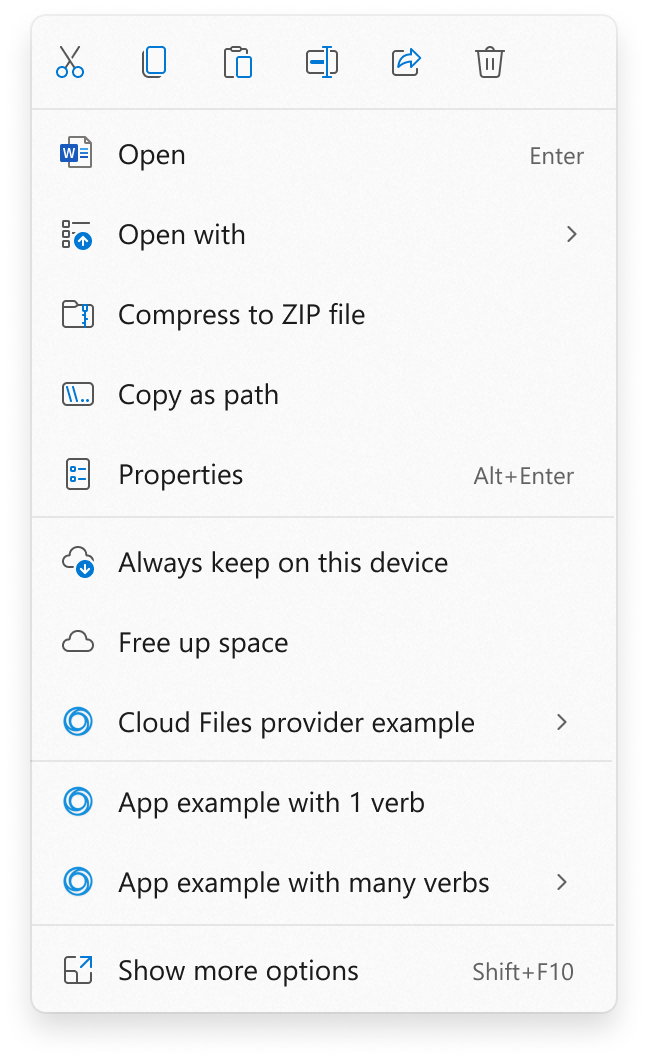
The original Windows 11 right-click menu is a mess.
The original Windows 11 right-click menu is a mess. Credit: Microsoft
The new preview also highlights a new Windows feature called Cloud Rebuild, a recovery option that can reinstall Windows 11 directly from the cloud, even when an existing Windows 11 fails to boot. Cloud Rebuild will pull the Windows 11 image and needed system drivers directly from Windows Update. Users will not need a custom recovery image or external media to reinstall Windows. There is an important distinction to note, however. Microsoft classifies Cloud Rebuild as a recovery option, but it behaves more like a fresh Windows install than a repair, as existing applications and files will not be included. Those worried about data security can sanitize entire system drives prior to reinstalling. For a full list of improvements coming to Windows 11, including changes to Xbox mode and settings, you can view the official Microsoft release announcement.